Python으로 디지털 시계 만들기이다.
#use this to create exe file with icon
#pyinstaller --onefile --noconsole -i"prg_icon.ico" dClock.py

#do not use below
#pyinstaller.exe --onefile --noconsole --windowed --icon="prg_icon.ico" dClock.py

#https://www.codespeedy.com/create-a-digital-watch-in-python/

#from data import images

import sys #to import system files
from tkinter import *   #whole module is imported
import time #importing local time
import ctypes
# reduce console window to minimized size
ctypes.windll.user32.ShowWindow( ctypes.windll.kernel32.GetConsoleWindow(), 6 )

#Used to display time on the label
def DClock():
    curr_time= time.strftime("%H:%M:%S")
    clock.config(text=curr_time)
    clock.after(100,DClock)

#making window
window=Tk()
window.title('Digital Clock') #adding title to the window
window.wm_attributes("-topmost", 1)

#giving name to our digital clock and styling it
message= Label(window, font=("arial",10,"italic"), text="Time", fg="red") #font size=100
message.grid(row=0,column=0)

clock= Label(window, font=("times",30,"bold"),fg="black") #font size=150
clock.grid(row=1,column=0)
DClock()
mainloop() #loop is closed
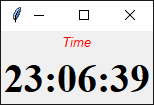
실행결과는 다음 그림과 같다.
'파이썬 언어' 카테고리의 다른 글
| Python, 남은 시간 계산하기(배치파일 이용) (0) | 2021.09.25 |
|---|---|
| Python으로 그림을 Icon 파일로 만들기 (0) | 2021.09.21 |
| Python으로 아날로그 시계 만들기 (0) | 2021.09.21 |
| Python으로 사진 크기 줄이기 (0) | 2021.09.21 |
| Python으로 사진 합치기 (0) | 2021.09.21 |


댓글