import javax.swing.*;

import java.awt.*;

import java.util.Date;

public class SimpleDigitalClock extends JPanel
{
JFrame frame;

int currentHour;
int currentMinute;
int currentSecond;

//Font that will be use to show digital clock
Font myFont=new Font("Tahoma",Font.BOLD+Font.ITALIC,20);

//Color that will be use to show digital clock
Color myColor=new Color(255,0,0);

//Font metrics that will use to store font informations
//For example, width of a character
FontMetrics fm;

public SimpleDigitalClock()
{
//Create a window using JFrame with title ( Simple Digital Clock )
frame=new JFrame("Simple Digital Clock");

//add(this) mean add created panel into JFrame
//Which panel ?
//See line 81 and 7 (I hope you understand it)
frame.add(this);

//Set default close operation for JFrame
frame.setDefaultCloseOperation(JFrame.EXIT_ON_CLOSE);

//Set JFrame size
frame.setSize(270,70);

//Make JFrame locate at center
frame.setLocationRelativeTo(null);

//Make JFrame visible
frame.setVisible(true);

/*
 *Loop that will make sure panel show current time
 *like current second, current minute and current hour.
 */
while(true)
{
 //It will do all code in method paint(See line 67)
 repaint();

 try
 {
  Thread.sleep(900);
 }
 catch(Exception exception)
 {
  exception.printStackTrace();
 }
}
}

public void paint(Graphics g)
{
super.paint(g);

/*
 *Create  current Date object. It means it store information
 *about current hour, minute and second.
 */
Date myDate=new Date();

currentHour=myDate.getHours();
currentMinute=myDate.getMinutes();
currentSecond=myDate.getSeconds();

//Set font that will use to draw digital number
g.setFont(myFont);

//Information about distance between number in digital clock
fm=g.getFontMetrics();
int hourXCoordinate=20;
int minuteXCoordinate=hourXCoordinate+(fm.getMaxAdvance()*2);
int secondXCoordinate=hourXCoordinate+(fm.getMaxAdvance()*4);

//Set color that will use to draw digital number
g.setColor(myColor);

//Draw hour, draw (:) between number, draw minute and draw second.
g.drawString(Integer.toString(currentHour),hourXCoordinate,20);
g.drawString(":",(hourXCoordinate+minuteXCoordinate)/2,20);
g.drawString(Integer.toString(currentMinute),minuteXCoordinate,20);
g.drawString(":",(secondXCoordinate+minuteXCoordinate)/2,20);
g.drawString(Integer.toString(currentSecond),secondXCoordinate,20);
}

public static void main(String[]args)
{
SimpleDigitalClock sdc=new SimpleDigitalClock();
}
}
2) Manifest 파일을 만든다.
Manifest-Version: 1.0
Main-Class: SimpleDigitalClock
3) Batch File을 만든다.
@echo off
javac SimpleDigitalClock.java
jar cvfm SimpleDigitalClock.jar m.txt SimpleDigitalClock.class
start javaw -jar SimpleDigitalClock.jar

pause
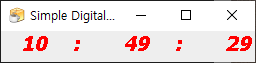
Run the program, it will show screen as follows.
'Java 언어' 카테고리의 다른 글
| Java, 타이머 만들기 (Jar 파일) (0) | 2021.09.25 |
|---|---|
| Java, Hello World 프로그램을 Jar 파일로 만들기 (Java Swing 프로그램) (0) | 2021.09.25 |
| Java, Jar 파일 만들기 (콘솔 프로그램) (0) | 2021.09.25 |
| Java로 스도쿠 게임 만들기(스도쿠 문제) (1) | 2021.09.20 |
| Java로 이차방정식 풀기 (0) | 2021.01.30 |


댓글