Coding관련하여 웹사이트에 저장하려면, 잘 되지 않는 경우가 많다. 그 것은 HTML의 특성때문이다.
그래서 파이썬으로 code를 html 형식으로 바꾸는 프로그램을 만들었다.
아래의 코드를 test.py에 저장한다. 굵은 글자 부분이 C code 이다.
s='''
#include <stdio.h>
#include <math.h>
double logB(double x, double base) {
return log(x)/log(base);
}
int main() {
double a = logB(3.0, 2.0);
double b = logB(5.0, 2.0);
puts("log3/log2, log5/log2, log3/log2 * log5/log2 = ");
printf("%lf %lf %lf", a, b, a * b);
return 0;
}
'''
t = s.split('\n')
def AddSpaceFirst(str):
firstSpace = True
ans = ''
for itm in str:
if itm ==' ' and firstSpace == True :
ans = ans + " "
elif itm =='<':
ans = ans + '<'
elif itm =='>':
ans = ans + '>'
elif itm =='&':
ans = ans + '&'
elif itm =='"':
ans = ans + '"'
elif itm =="'":
ans = ans + '''
else:
ans = ans + itm
if itm != ' ' :
firstSpace = False
return ans
for itm in t:
print('<p>' + AddSpaceFirst(itm) + '</p>')
코맨드 프롬프트에서 실행하려면 다음과 같이 입력한다.
python test.py
실행 결과는 아래와 같다.
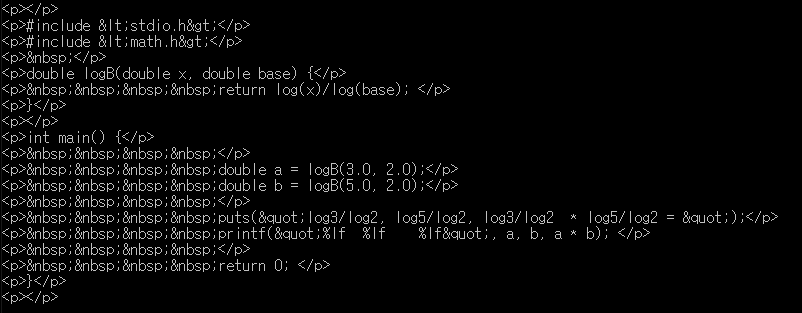
이 결과를 마우스로 선택하여 복사하든지 file로 저장하여 html 의 일부로 사용하면 된다.
'파이썬 언어' 카테고리의 다른 글
| 폴더의 모든 파일의 문자열을 replace 하기 (0) | 2021.09.09 |
|---|---|
| 파이썬, 코맨드 창에서 읽어 들이기 (0) | 2021.01.01 |
| 파이썬을 이용해서 Log 함수 계산하기 (1) | 2021.01.01 |
| 파이썬 리스트를 정렬하여 출력하는 방법 (1) | 2020.12.30 |
| Windows 의 Path 변수 표시하기 (Python 이용) (0) | 2020.11.19 |

댓글